

Magnetic design tool for experts and newcomers.
Downloads and resources

SmartNetics Past Webinars5

Explore the New SmartNetics 2026.1
Watch it here.




SmartNetics Frequently Asked Questions18
General questions
What is SmartNetics?
SmartNetics is a new approach to the design and optimization of magnetic components, aimed for the expert engineer as well as for a newcomer to the magnetic design. It offers a range of features tailored to meet the needs of the electronics industry.
Unlike other commercial software, SmartNetics does not provide a single black-box solution. Instead, it provides the user with every design that meets their needs, allowing them to select the one that is best suited for every particular application, regardless of whether the focus is on performance, volume, cost or any possible combination of parameters.
Key Features of SmartNetics:
- Waveform Input: Supports sinusoidal, triangular, and rectangular waveforms, as well as custom inputs from .csv files.
- Geometries: Includes core configurations with EE shapes, utilizing E or parallel U
- Planar magnetics: Allows the direct export of the planar design PCB to KiCad
- Winding Strategies: Offers concentric winding configurations on the center
- Gapping strategies: Supports standard gapping (same gap in every leg), single gap in the central leg or distributed gaps in the central
- Device Types: Design and analyze single-phase inductors and single-phase transformers with a single secondary.
- Customizable Databases: Manage and edit databases from external
- Accurate Thermal Modelling: Simulates dissipation by natural or forced convection
- Device Comparison and Selection: Graphically compare and filter designs across up to eight parameters simultaneously.
- Integration with Third-Party Tools: Easily export designs to advanced simulation software like Ansys, Flux, FEMM for finite element analysis, KiCad for PCB design, and to PSIM for circuit simulation
- Professional Report Generation: Export comprehensive design and analysis reports in PDF format, facilitating documentation and communication with manufacturers.
What is the typical workflow of SmartNetics for magnetics design?
The typical workflow consists of five steps, as shown in the next figure:
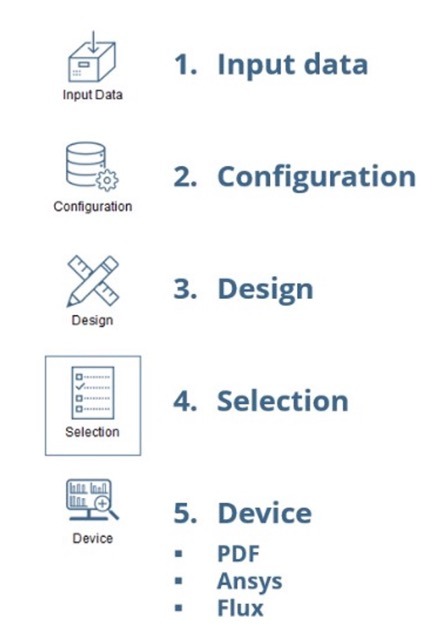
- Input data: Data input dialog. In this dialog the user can define and configure the voltage and current waveforms and the needed inductance or turns ratio for the
- Configuration: Design configuration dialog. In this dialog the user can define the databases to be used, the design restrictions and the models considered for the
- Design: Begin design In this dialog the design procedure begins, and results can be analyzed and compared graphically. Here the user can filter out the results to reduce the number of possible designs on the selection step.
- Generating at least one valid design enables the button for the 4th step (Selection).
- Selection: Device details and selection dialog. In this window the user can access the value of every parameter used in the design and can select a particular device for its comprehensive
- Selecting a design enables the button for the 5th step (Device).
- Device: Comprehensive analysis dialog. In this window the electrical and mechanical properties of the device can be seen, and it can be exported to third-party
How can I introduce input data into SmartNetics? Can I design both inductors and transformers?
You can design inductors, defined by their current and desired inductance and transformers, defined by the current and voltage on their primary side and their turns ratio. Both voltage and current can be defined by means of one of the generic waveforms defined inside SmartNetics (sinusoidal, triangular, or rectangular) or by loading a csv file.
What core materials and geometries are currently included in the database of SmartNetics? What other parameters can I select?
In the current version, only E cores (or U cores, used in parallel to generate an E core) are considered. Regarding the materials, any material can be defined, including ferrites, nanocrystalline, amorphous and iron powder. On top of that, the user can select the conductor geometry, material and sleeve, and the insulators.
Can you enter user-defined geometries and materials that are not included in the database of SmartNetics by default?
Regarding the core geometry, the user can enter any dimensions, even made-up ones, but is restricted to the use of E cores (or U cores, used in parallel to generate an E core).
For any other topic (core materials, conductors, insulators, etc.), the user can modify any entry of the database or add new ones.
What cooling methods for temperature calculation are covered by SmartNetics?
The current version supports natural or forced convection (including a fan).
What can users expect from SmartNetics in future versions?
Capabilities planned in future upgrades during SmartNetics development will be addressed based on both collected user feedback and the difficulty of analytical resolution and implementation in the software.
Some of the main topics expected to be included in SmartNetics in future versions are:
- Waveform input:
- From harmonic content
- Trapezoidal
- Geometries:
- Cores with rectangular window: RM, Pot, PQ, ETD, …
- Toroids
- Winding strategies:
- Interleaving
- Upper-lower center leg winding
- Side leg windings
- Device types:
- Three-phase inductors with 3 columns
- Three-phase inductors with fourth column
- Single-phase multiple secondary transformers
- Three-phase transformers
- Electrical steel
- Thermal model:
- Databases for different media: air, oil, potting
- Temperature feedback to core loss calculation
- Device comparison and selection:
- Selection from table with organization (least to greatest or greatest to least) by columns.
- Device parameters:
- Parasitic capacity
- Export to third party tools:
- Electrical circuit simulation in SIMBA
- 3D CAD design tools
- Others:
- Effect of fringing flux on conductor losses
- Electrical isolation based on regulations
- B-H curve analysis
- Mechanical drawings
User experience questions
I have a particular core geometry, and a particular core material selected but there are no designs using that combination.
Check that said core geometry has that particular material as one of its possibilities in the “Available materials” field in the database. Remember that the reserved word “Any” can be used to allow any material for that particular geometry.
The calculated gap seems to be twice as needed.
In SmartNetics, the value used for the calculation is not the distance between cores, but the total length of air the flux lines would travel in straight lines. This relates to gap (distance between cores) differently depending on the gapping strategy:
- Standard gapping: same gap for every The total length of the magnetic path through the air is twice the distance between cores.
- Single gap: a single gap in the central The total length of the magnetic path through the air is the distance between cores.
Distributed gaps: a number of gaps in the central columns. The total length of the magnetic path through the air is the sum of every gap.
Some fields described in the help documentation are not shown in the application.
Some fields are only shown when some restrictions are Some examples:
-
- Voltage waveforms are only present if “Transformer” is
- Symmetry simplifications in Flux are only available for 3D
There are no available results (or fewer than expected).
Only the designs that comply with every restriction are presented. Try reducing the restrictions to increase the number of valid results.
The maximum number of parallel wires is set to a given number but the designs only get to a lower one.
The number of wires in parallel is limited by the maximum imposed and by the available window. If the wire does not fit the window using the imposed maximum, a lower number is used.
I want a transformer with an air gap.
In the current version only single-winding devices (inductors) can have an air gap.
The leakage inductance does not match the predicted one.
Leakage inductance is closely related to winding positioning and manufacture. The values provided are only a very rough estimation, and very big differences are expected.
The PDF generation never ends or does not produce a pdf.
The PDF is created by means of a third-party software. Please, follow the installation step shown in the corresponding section of the user manual. When installing, please make sure to enable libraries to be installed (automatically or asking), otherwise the PDF cannot be created.
Every aspect of the designed magnetic is set to a certain value but the design procedure does not produce any result.
Even if one (or some, or every) design parameter is set (see the corresponding section of the user manual), only the designs that comply with every imposed criteria are displayed. If everything is set to a fixed value but that particular design would saturate, or handle a current higher than the maximum, etc, it would not be shown. Please, reduce the restrictions to ease the consideration of a particular design.
Finite element simulations take too long.
FEM simulations are time and resources consuming, so lengthy simulation times are expected. To speed up the simulation try avoiding the inclusion of unneeded items for electromagnetic simulations, like coil formers or insulators.
I cannot choose the minimum distance between PCB tracks.
In the current release, the standard for PCB track distance cannot be selected.
SmartNetics does the calculations for clearance and creepage based on IPC-2221b.